Tutorials
Running a standup on a shared board
Four columns, a rule about blockers, and the thing a remote standup has never had: you can see where everyone is looking.
Last updated 29 August 2026
The standup most teams run is a round of three questions — what I did yesterday, what I am doing today, anything blocking me — taken one person at a time. It survives because it is easy to start, and it goes wrong the same way everywhere: everybody waits for their turn, listens to nobody, and reports status to whoever is chairing instead of coordinating with each other.
The specific failure is worth naming, because it is the one this board fixes. In a round of people, nobody ever says "this piece of work has been in review for four days". They say "I'm still on the shipping thing", which is true, sounds fine, and hides the four days. Work rots quietly when the meeting is organised by person, because a person is never stuck — only a piece of work is.
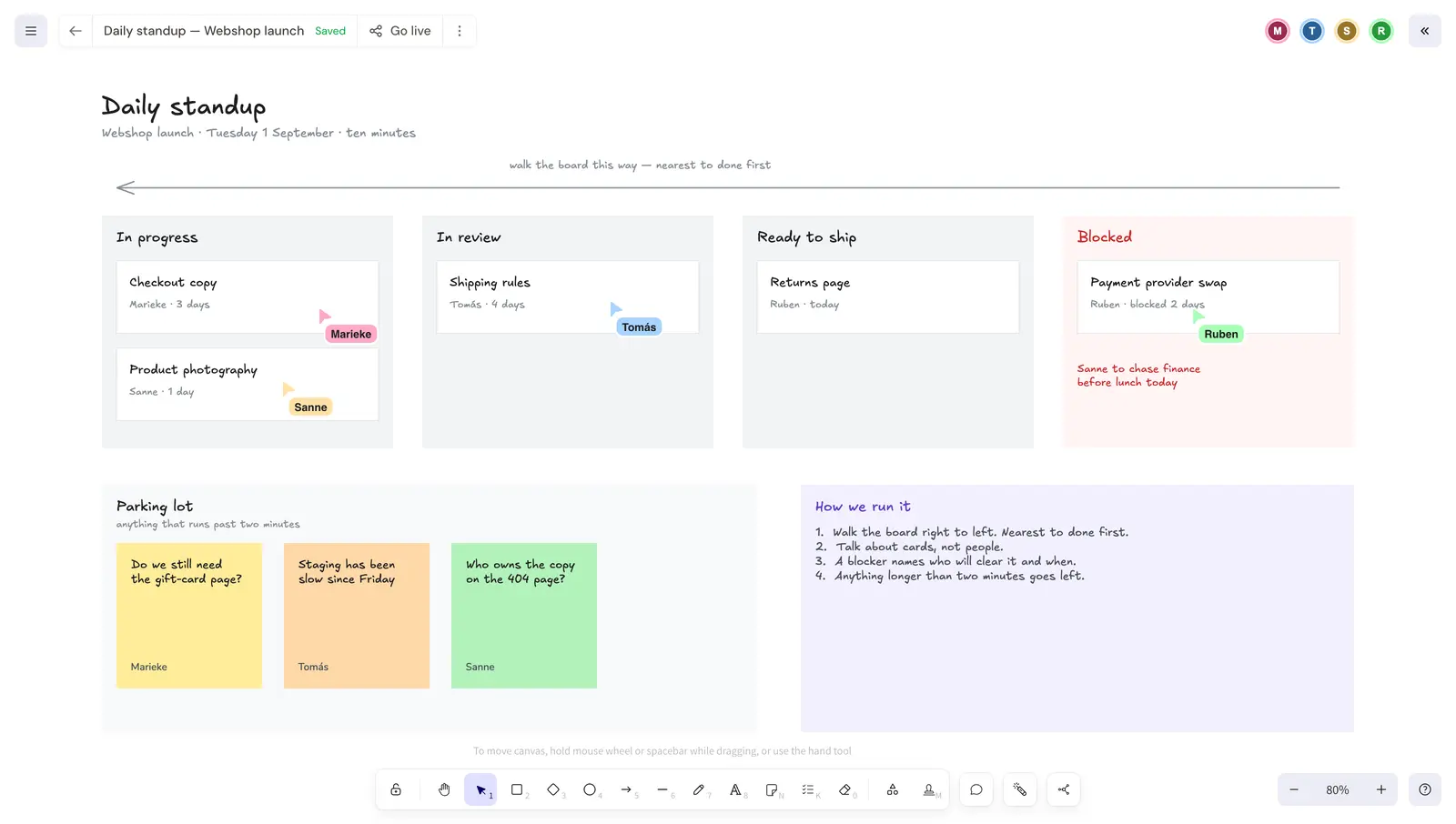
So organise the meeting by work. Here is the whole board.
The columns
Three columns for work in flight — In progress, In review, Ready to ship — and a fourth, tinted red and deliberately outside the flow, for Blocked. Every card carries two things: who is on it, and how long it has been sitting where it is. The age is the part that does the work, and it is the part a round of people never produces.
Keep the columns to the ones your work actually passes through. A column exists because work waits there, not because a process diagram says it should.
Walk it right to left
Start at the column nearest done and move backwards. The arrow across the top of the board is there so nobody has to be reminded.
The reason is that unfinished work is worth nothing until it ships, so the item one step from done is the most valuable thing on the board and gets attention while people are still fresh. Walking the other way spends the first five minutes on things that started yesterday and cannot possibly be in trouble yet, and reaches the nearly-done work when everyone has stopped listening.
A blocker names who will clear it and when
"Blocked" on its own is a complaint. A blocker on this board is written with a person and a day beside it, in red, under the card:
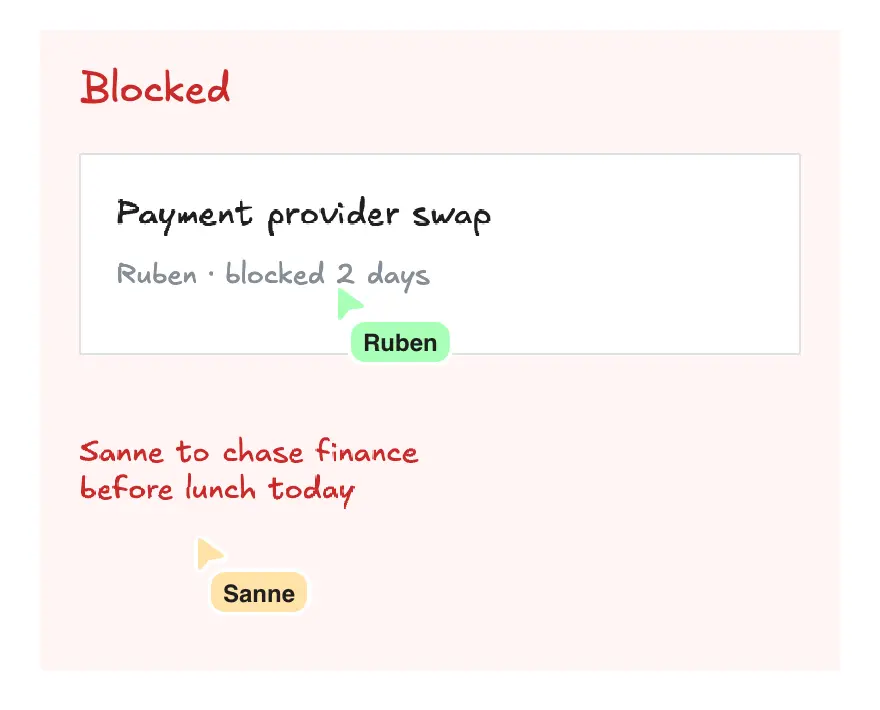
Note who is named. It is not Ruben, whose card it is — he is the one who is stuck. It is Sanne, who can go and get the thing. A blocker that resolves to "Ruben will keep chasing it" is the same blocker tomorrow, and the day after that it is a two-day-old card nobody feels responsible for.
What the cursors change
This is the part that does not exist in a call plus a document, so it is worth being concrete about rather than calling it collaboration.
Everyone on the board has a cursor with their name on it, and everyone can see everyone else's. When the group is discussing one card, you can see whether the group is actually on that card:
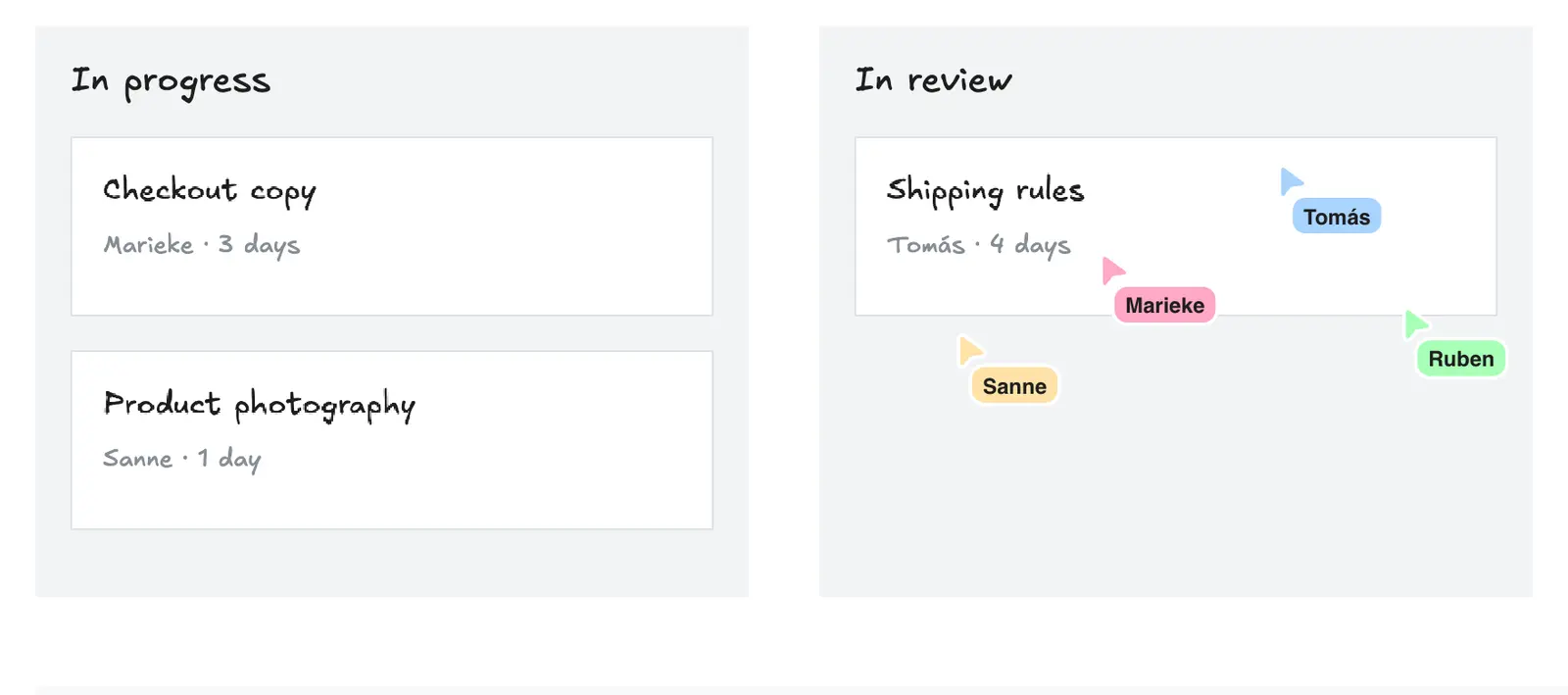
Three things follow from that, and they are small but they are the whole reason to do this on a board.
Whoever is facilitating does not have to say "the shipping rules card, third column, the one Tomás is on" — they move their cursor there and the sentence is unnecessary. Somebody who has lost the thread can see where everyone else is instead of asking. And when the conversation has quietly drifted, you can see it happen: one cursor wanders off into the parking lot, then another, and the item being discussed has stopped being the item.
If you want to be dragged along rather than follow by hand, click somebody's avatar in the top-right and your canvas goes wherever theirs goes until you stop:
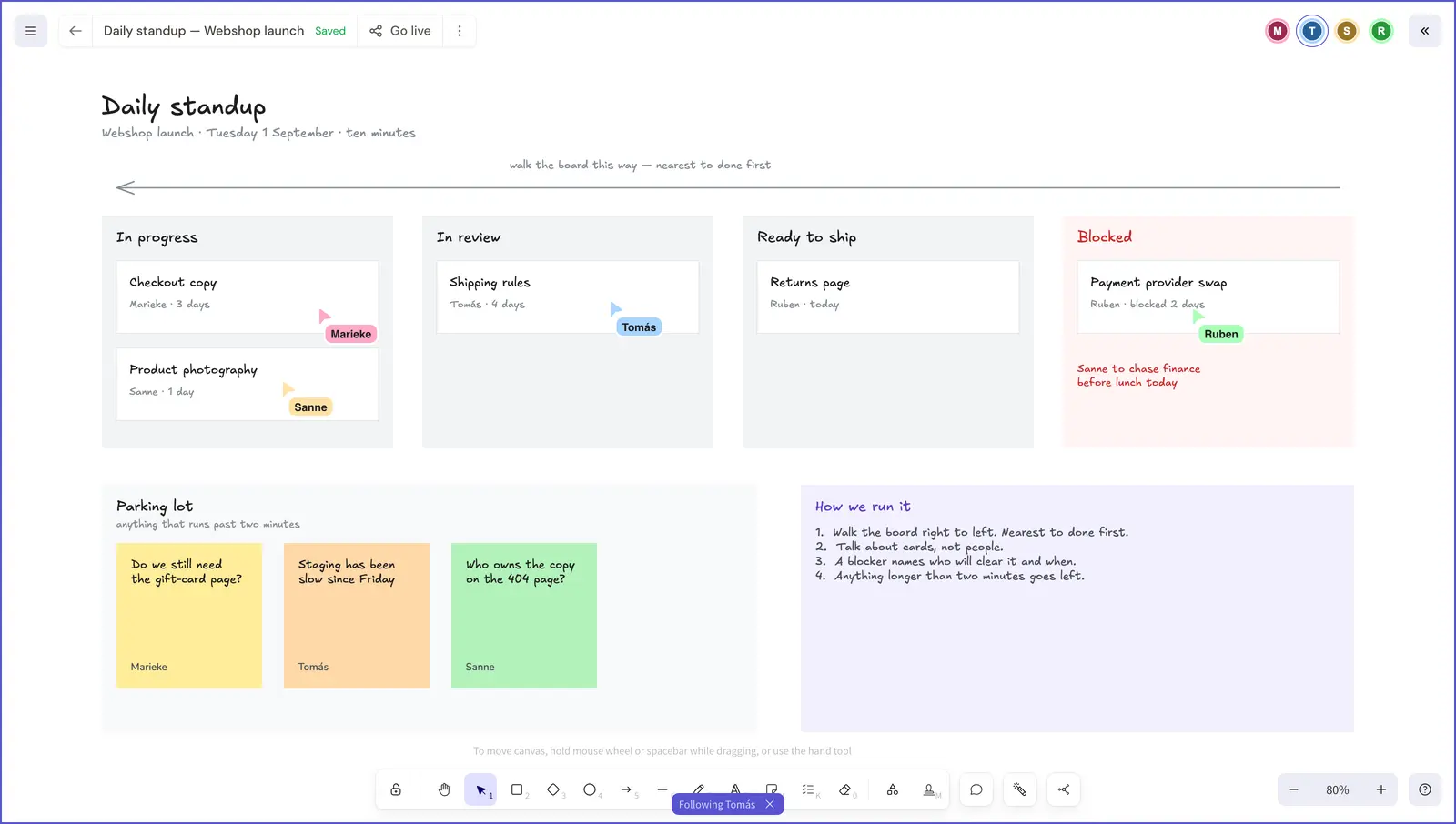
That is worth handing to whoever is walking the board, so that a ten-person standup is not ten people scrolling independently.
The parking lot
Anything that runs past about two minutes goes into the parking lot as a sticky note, and the
standup carries on. Press N, click, and type.
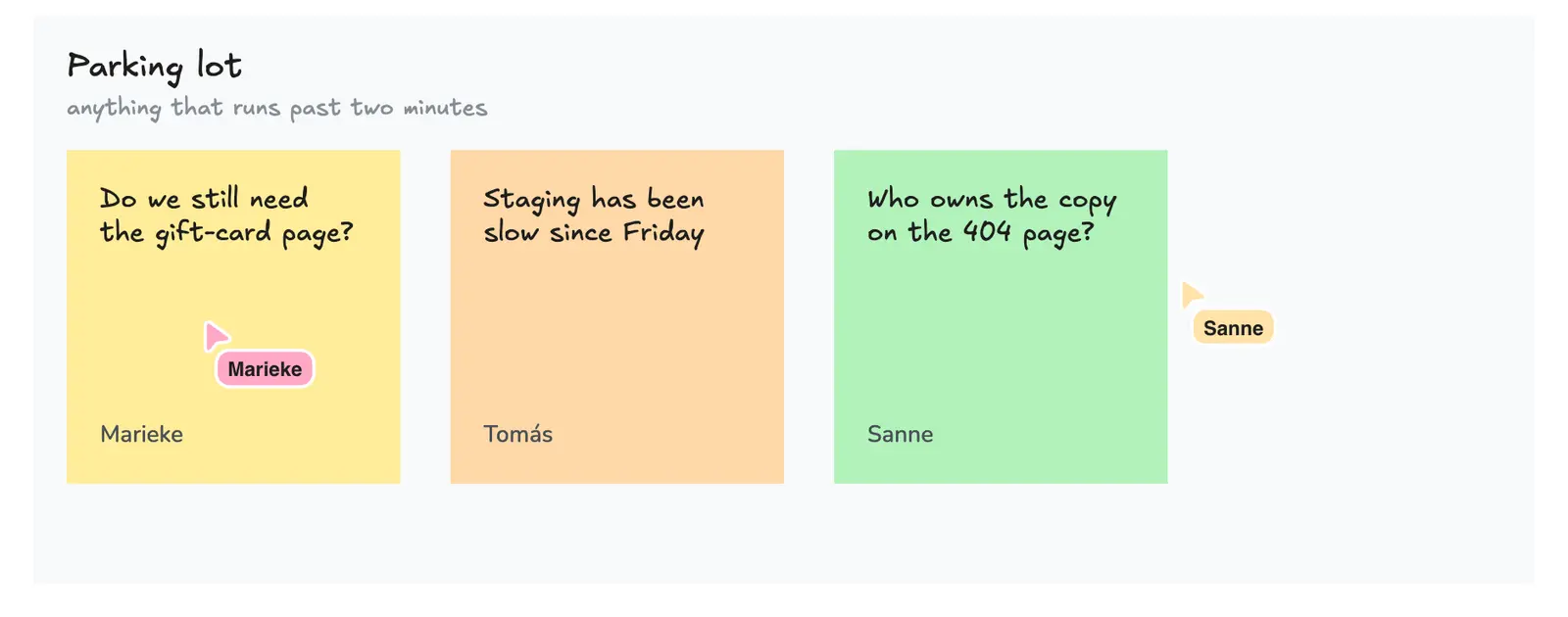
The name at the bottom of each note is not decoration and it is not something you type. A note carries whoever wrote it, so when the standup ends the parking lot is a list of items that each already have a person attached — and "who raised this?" is not a question anybody has to answer from memory ten minutes later.
Deal with the parking lot immediately after, with the two or three people it concerns, rather than keeping everyone else on the call for it. That is the trade the parking lot is making: the conversation still happens, just not in front of eight people who do not need it.
Before and after the meeting
The board is worth something when the call is not happening, which is what makes it different from a screen share.
Before: whoever gets in first moves their own cards, so the ten minutes are not spent discovering the state of the board. Because the board is live, moving a card at 9:15 is visible to everyone else at 9:15 without a refresh or a message.
After: anything that needs a written follow-up goes on the card as a comment rather than into chat. A comment in Kromdraw is pinned to the shape it is about, so it is still attached to the card tomorrow, which is more than can be said for the message that scrolled away.
Share the board with Go live and people can open it without an account. That matters for the contractor or the client who is in the standup twice a week and is never going to be given a seat.
What this does not fix
A board makes the state of the work visible. It does not make a fifteen-person standup useful, it does not replace the conversation the parking lot defers, and if nobody moves the cards it is a picture of last week. The rule that keeps it honest is the boring one: the board is moved as the work moves, not in the four minutes before the meeting.
The team, work and blockers in this example are invented. This is one way a team could run the meeting on a board, not an account of how Kromdraw runs a standup.
Doing it yourself
The editor on the front page is the real one, so you can lay this out without an account.
- Draw the columns your work actually passes through, plus a Blocked column outside the flow.
- Put an arrow across the top pointing left, so nobody re-litigates the direction each morning.
- Give every card an owner and an age. The age is the signal.
- Write a blocker with a name and a day, in a colour you cannot miss.
- Keep a parking lot, and press
Nthe moment something runs long. - Write the rules on the board itself, in the corner, where the argument would otherwise happen.